LanguageTool - Self Hosted Grammar plugin
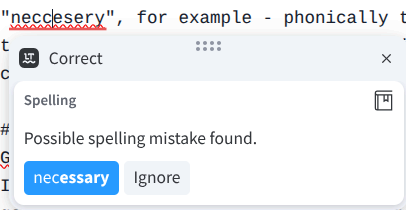
I have Dyslexia. Back when I first moved to Microsoft Word 2.0 (1991 - although I would guess I'd have been using it from 1995, 6 floppy disks) the built-in spell check was invaluable. When I moved to Word 6.0 I got the squiggle lines underneath misspellings, and found this helped provide real-time feedback. Since then the tools have become more comprehensive, better at grammar checking and so forth. That said, I've not really run into anything I'd consider a big deal.
Some examples of things I misspell
Over the years, my dyslexia has been dulled by experience, I've simply taken a lot longer to get to an average level of skill with English. There are some examples of words which I just can't get right, "neccesery", for example - phonically this follows the rules, but it's far enough out that built in tools won't identify the correct spelling. I typically google the word, which seems to have better correction.
Grammarly
Grammarly was an interesting tool, but I could never get over the plugin with lots of access to what I'm doing, some questions being raised around privacy and a work provided an "Install this, and we're going to remove it and then have a very awkward conversation about why you think it's a good idea to blast corp data into a cloud you know little about" edict.
Languagetool
LanguageTool is interesting; it provides better spelling corrections, and more depth grammar checking than built in tools. More interestingly, it's possible to self-host their "basic" functionality - which actually includes most of the tools I would want.
Recently there was some controversy that they stopped their browser plugin providing "basic" functionality from the cloud, which is actually how I heard about the tool. This doesn't affect self-hosting users; you just need to point the LanguageTool browser plugin at your own endpoint and it'll work fine.
There are some "Premium" models, these provide more AI based spelling and grammar checks, for example it does a better job of agreement errors ("All the reply" vs "All the replies") - but this isn't actually the sort of thing I tend to get wrong.
Install Process
Sizing
There are some criticisms of LanguageTool being quite heavyweight. The main issue is the n-gram data sets ("Lists of words and rules") are large, so you need a reasonable amount of disk space. My instance seems pretty happy with 50gb of disk space, 3gb of RAM and 2 cores.
Docker
Docker is probably the easiest way to install Langagetool, I used the erikvl87 docker build via docker compose. Once I'd got this starting up (I had a few networking issues which make it uncontactable), you'll then want to download the ngram files. I chose to put my instance behind Caddy as a HTTPS reverse Proxy, because I felt a bit weird about sending things I'm writing across my network in plaintext. Certainly you'd want to do this if you felt it was a good idea to have your instance accessible on the internet.
Browser
Once you've done that, you can set up the languagetool plugin in your browser, find Advanced Options ("For Professionals") and point it at you endpoint.